
Screen intelligence platform

See the activity.
Find the answer.

Live screen monitoring, recording and searchable activity history in one intelligent platform. Every customer runs a closed system of their own: a dedicated hosted instance in our data centre, or an on-prem Blackbox installed in your own infrastructure. No shared platform, no common pool.

Build your plan and see the cost
AES-256 at restWindows 10 / 11 agentDedicated instance or on-prem Blackbox
screlyx / dashboardlive
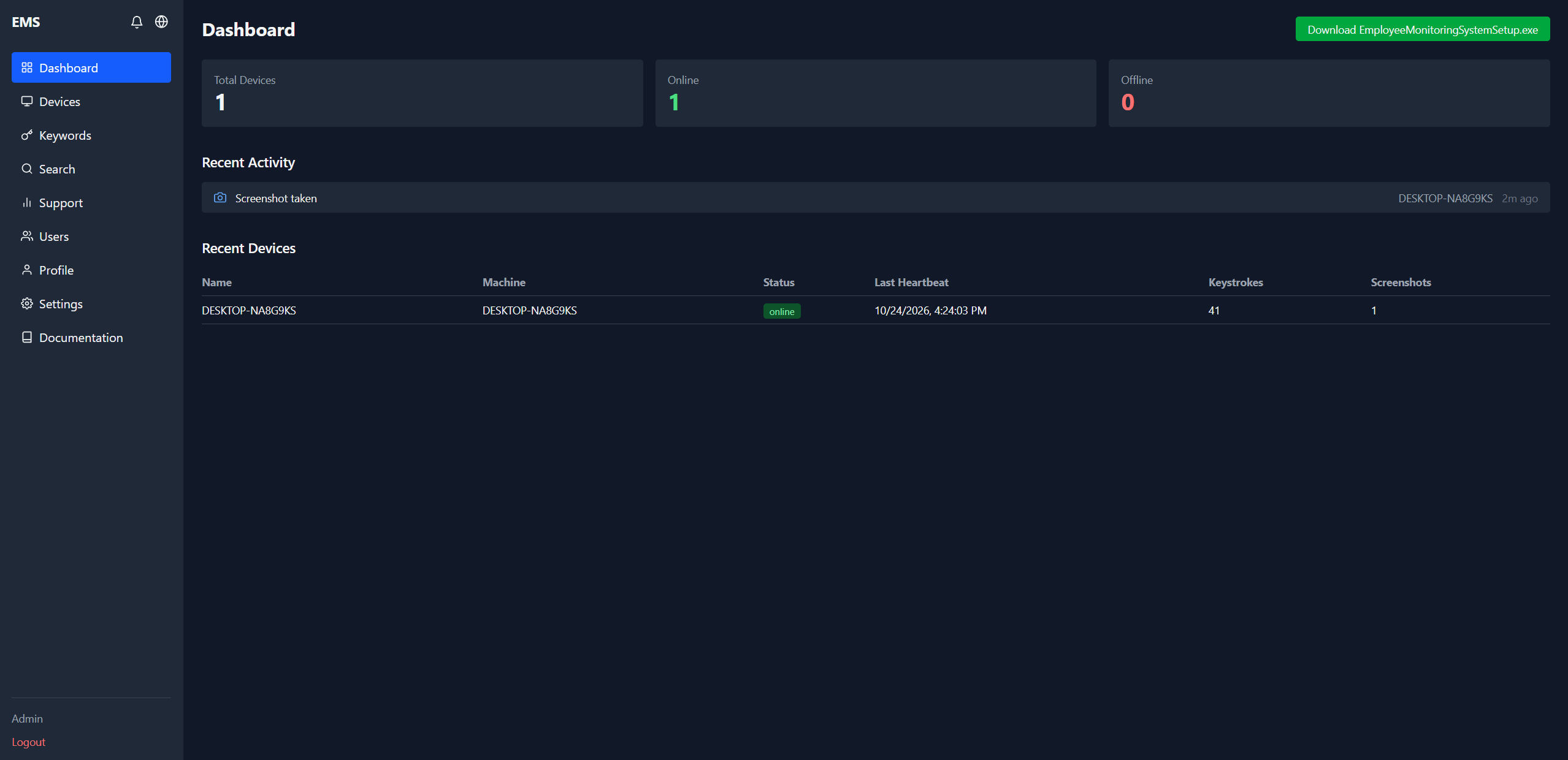
Screlyx dashboard showing device totals, online status, recent activity and the monitored device table
5–25FPSLive screen view
AES-256Encryption at rest
30 sOffline detection
15 sPolicy sync to agent
1–365daysRetention window

Platform modules

Every tool in one system.

Live screen monitoring, recording, keyword search and replay, connected so one question leads straight to its answer.

Screlyx Live

Real-time visibility into digital workflows

Authorised users watch the screen activity of designated company computers as it happens: a current task, a problem, an operational event that needs eyes now.

  • Live screen view
  • Live keystroke stream
  • Visual access to designated workstations
  • Faster situation assessment

What you need to check now, you can see now.

Screlyx Record

Reconstruct digital events

Screen video recording and scheduled or keyword-triggered screenshots keep designated workflows reviewable later, so an error, misuse or incident can be rebuilt from evidence.

  • Screen video recording (MP4)
  • Screenshot intelligence
  • Past activity on demand
  • Support for reviews and audits

You do not have to guess about the past.

Screlyx Search

The information you need is closer than you think

Instead of scrubbing through long recordings, search by keyword across the indexed activity trail: keystrokes, windows, processes, browser tabs and keyword alerts.

  • Case and ticket identifiers
  • Project and product references
  • Events tied to specific terms
  • The relevant part of a past workflow

Stop scrolling. Start finding.

Screlyx Replay

Review what happened in context

Replay is not a single screenshot taken out of context. Step through the session around an event so the lead-up and the circumstances are part of the answer.

  • Review earlier recordings
  • Timeline of events
  • Investigate how an error arose
  • Understand the workflow

Not only what happened, but how we got there.

The platform

Every signal, in one place — with the context that makes it usable.

Most tools give you a screenshot and a number. Screlyx gives you the keystroke, the window, the process, the browser tab and the alert trail behind it.

Agent → encrypted server → dashboard
No third-party data broker

Live keystroke stream

A real-time feed per device, with timestamp, window title, process name and the key itself. History is searchable and grouped by application.

live · DESKTOP-NA8G9KS streaming
[4:26:31]Notepad· notepad.exeapi
[4:26:32]Notepad· notepad.exeapib
[4:28:24]README.md — VS Code· Code.execommit
[4:28:27]Save as (PickerHost)· PickerHost.exe↵

Live screen view

Watch any machine in real time at 5–25 FPS, record the session to MP4, and keep the clip in the same place as the rest of the evidence.

Keyword intelligence

Add a keyword with aliases. The moment it is typed, the device captures a screenshot and notifies the admin groups you choose.

Screenshot vault

Thumbnails, lightbox, download and delete — every capture tagged with the keyword that triggered it, if any.

Browser & app context

See open windows, all browser tabs across six browsers, and flag matches against your watched-page list.

Fleet control

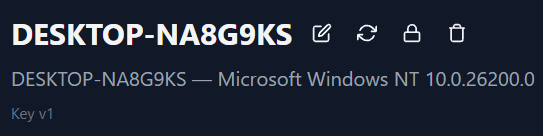
Rename, update, uninstall or delete a device from the dashboard. Push the latest agent to one machine or all of them at once.

Update allRemote uninstall

Responsible by design

Retention from 1 to 365 days with automatic purge, key rotation, role-based admin access and group-scoped alerts. Monitoring you can explain to your team.

Device detail header in Screlyx with rename, update, lock and delete controls

Product tour

The actual interface. Nothing re-imagined for a deck.

These are live screens from the Screlyx console — the same views your administrators use every day.

Dashboard view in the Screlyx dashboard

Live fleet totals, online and offline counts, recent activity and the device table — refreshed over WebSocket.

1 / 6

Deployment models

Two ways to run Screlyx. Both closed, both yours.

There is no common system and no shared pool. Every deployment is a dedicated environment created for one company, in one of two forms.

Dedicated hosted instance

A closed system created for your company alone.

Your own server, your own database and your own central admin interface, placed in the data centre we operate for you. It is not a shared platform: every entity and every company runs in a separate, isolated system with its own configuration.

  • One instance per company — never shared tenancy
  • Own central interface, isolated from other customers
  • Closed network, hardened before handover
  • Operated and patched on your schedule

Your data lives in a system that exists only for you.

On-prem Blackbox

Pre-configured, delivered, installed in your own room.

The Blackbox arrives ready to run: server, database and dashboard are already configured. You place it in your own infrastructure, connect the agents, and the system is in production — nothing to assemble, no vendor cloud involved.

  • Pre-configured appliance, delivered sealed
  • Runs entirely inside your own network
  • Only the agents need connecting
  • No dependency on an external cloud

Install the box. Connect the agents. Done.

Onboarding

Every handover starts with a requirements survey.

Neither model is self-service: both are configured for security before they are handed over.

  1. 01

    Requirements survey

    Before anything is deployed we send a short assessment: device count, sites, systems and policies. It determines the quantity and the configuration you actually need.

  2. 02

    Configuration & security

    Every system is configured before handover: keys, retention, admin groups and network access. For security reasons nothing is activated until that is reviewed and signed off.

  3. 03

    Enterprise rollout with UEM

    At enterprise scale the agents are distributed through your Unified Endpoint Management platform — Intune, SCCM and comparable tools — alongside your other software.

  4. 04

    Corporate branding

    During the assessment we can apply your own corporate design to the admin interface, so the system and its interface look like an in-house application.

Start with the survey: it sets the device quantity, the configuration and the handover date.

Solutions

One platform. Many business uses.

From everyday workflow review to incident reconstruction, one evidence trail serves several teams.

Operations manager reviewing a live activity timeline on a large monitor in a bright officeOperations

Digital workflow oversight

See how work actually runs, not how the process diagram says it runs.

More and more business runs inside computer systems. Review designated, lawfully monitorable workflows live or afterwards, and spot points worth further review, training or process improvement.


IT engineer and colleague investigating a reported problem on a laptop at nightIT support

Troubleshooting and event reconstruction

The error is on screen. Now you can see what led to it.

What happened before the error appeared? Which actions led to it, on which screen? Recordings and the keystroke trail help answer those questions.

Security analyst reviewing screen activity on monitors in a dim operations roomSecurity

Information security investigations

A keyword alert fires. The evidence is already searchable.

When a digital incident is investigated, reconstructing the affected screen activity matters. Screlyx is an additional visual source in properly authorised, purpose-bound reviews.

Two colleagues reviewing a recorded work session together on a laptopQuality

Quality control and process improvement

The result looks wrong. The recording shows where the step slipped.

In complex workflows the cause of an error is not always visible in the result. Targeted review of recorded sessions exposes deviations and training opportunities.

Compliance officer reviewing a case file and screen timeline in a glass meeting roomAudit

Audits and internal investigations

When the question arrives, the material is there to answer it.

The quality of an investigation depends on the information available. Searchable recordings support preparing and running reviews.

Who it is for

  • Executives. More transparency in digital workflows and better-grounded decisions.
  • IT leaders. Visual help diagnosing technical problems and system usage errors.
  • Security & compliance. Reviewable screen events for authorised, purpose-bound investigations.
  • Operations & audit. Check designated workflows and find where processes can improve.

In motion

Watch the situation, not the slide.

Three six-second clips of the moments Screlyx is built for.

Troubleshooting · 6s
An error at 14:32. Six clicks earlier is where the answer lives.
Incident review · 6s
A keyword alert fires. The session is already recorded and searchable.
Process review · 6s
A process keeps slipping. Watch the session, fix the step, prove it.
AI bans, data loss and incident tracing: the full scenarios

How it works

Four steps to searchable digital events.

From screen to insight.

  1. 01

    Define the scope of oversight

    A requirements survey sets the scope: workstations, workflows and review goals, plus the internal rules, permissions and data handling conditions of your rollout.

  2. 02

    View or record

    Screlyx gives live insight and screen recording for authorised activity: live view, keystrokes, screenshots and MP4 sessions.

  3. 03

    Find the relevant content

    Use keyword search across the indexed activity trail to identify the information that matters for the review.

  4. 04

    Replay, verify, decide

    Review the related recording, examine the circumstances and use the findings for the right company decision.

The alternative

Monitoring without the surveillance theatre.

The category grew up selling fear. We built the same depth of evidence with clearer boundaries: your server, your keys, your retention window.

Capability
Legacy suites
Screlyx
Live keystroke stream with window context
Batch exports, if at all
Real-time, per device
Live screen view with MP4 recording
Separate add-on module
Built in, 5–25 FPS
Keyword-triggered screenshots
Enterprise tier only
Included, with aliases
Browser tab visibility & watched pages
Partial URL logs
All tabs, flagged
Email alerts routed to admin groups
Complex rule engine
Two clicks
Deploy on your own server
Rarely offered
First-class option
Retention policy you control
Paid add-on
1–365 days, auto-purge
Evaluated:TeramindVeriato CerebralActivTrakControlioInterGuard+5 more
See the full landscape

Security & governance

Designed to survive a compliance review.

Monitoring is only useful if the evidence holds up and the boundaries are documented. Both are product decisions, not footnotes.

Deployment

Two closed models, never a shared system: a dedicated hosted instance created for your company in our data centre, or an on-prem Blackbox pre-configured for your own infrastructure. Both are configured and hardened before handover.

HTTPS / WSSJWT sessionsAPI keys per agentKey rotation

Encrypted end to end

Keystrokes, screenshots and recordings are stored with AES-256. Transport is protected by the server's RSA public key, with HTTPS and WSS in production.

Keys you can rotate

Generate, rotate and retire encryption keys from the console, with a re-encryption job that migrates older data before a key is withdrawn.

Retention on a timer

Set 1 to 365 days. A cleanup job runs every six hours and permanently removes older keystrokes, screenshots and recordings — files included.

Scoped admin access

Named administrators, admin groups and JWT sessions. Alerts reach the group that needs them, not the whole company inbox.

Your infrastructure

Run the server where your data belongs. No vendor-side copy, no shared tenancy, no surprise subprocessor in your DPA.

Responsible monitoring

Visibility with responsibility.

Transparent oversight, respected privacy. A well-run monitoring programme meets legal, organisational and data protection requirements, not only technical ones.

Purpose limitation

Screen monitoring should serve a defined, lawful and previously communicated purpose.

Necessity and proportionality

The degree of oversight should match the goal; choose less intrusive tools where possible.

Prior notice

People affected should be told the purpose, method and data handling conditions of the monitoring.

Access permissions

Only people with proper authorisation should reach the data, scoped by admin group.

Retention

Set retention from the purpose of processing and the rules that apply; Screlyx purges automatically.

Using Screlyx does not by itself ensure legal compliance. The deploying organisation must establish a lawful basis, proportionate processing, notice and, where required, a data protection impact assessment.

Pricing

One platform, one price per device.

Every monitoring module is included in every plan. You pay per monitored device — not per feature, not per module, not per alert.

Online Starter

$9/ device / month

The essentials for a first monitoring programme — online only.

  • Online deployment only
  • Live view and scheduled screenshots
  • 90-day retention with auto-purge
  • Email support included
  • Annual prepayment: 30% off
Plan it
Most chosen

Online Business

$14/ device / month

The full platform, hosted for your company alone — online only.

  • Online deployment only
  • All platform modules included
  • Live view, MP4 recording, keyword search
  • 1–365 day retention with auto-purge
  • Email support included
  • Annual prepayment: 30% off
Plan it

On-prem Blackbox

$20one-time licence + monthly

Pre-configured appliance, installed in your own room.

  • Appliance hardware included in the licence
  • Runs entirely inside your own network
  • Minimum 20 devices
  • One-time licence plus monthly subscription
  • Email support included
Plan it

Enterprise

Custom

Multi-site, your infrastructure, your rules.

  • Dedicated instance or Blackbox at scale
  • UEM-based rollout (Intune, SCCM)
  • Corporate branding in the admin interface
  • Custom retention & key policy, SLA
  • Volume discounts from 100 devices
Talk to us

Annual prepayment: 30% off · Volume discounts from 100 devices · Final configuration confirmed after the requirements survey

Email support included · Phone & remote support $10 per client · Full installation & remote support $30 per client, chosen in the planner

Build your plan and estimate the cost →

Questions

The things buyers ask on the second call.

If something is missing here, ask us directly — we answer with specifics, not a brochure.

SCRELYX — Screen Intelligence Platform

Start with a walkthrough

Put evidence behind every decision about work.

A 30-minute session: your use case, your legal context, and a live console with a real device connected. No slide deck.